Recently, I’ve been struggling—in the best way possible—with a challenging book: Building a Large Language Model from Scratch. It is a fantastic resource packed with hands-on examples, but it is undeniably dense.
The book dives deep into concepts I either never formally studied or haven’t touched in nearly two decades: PyTorch, complex attention mechanisms, and calculus (like chain rule derivatives). My initial expectation was to power through a chapter every two to three days.
Reality hit me hard right at the beginning.
There is an appendix cheerfully titled “Learning PyTorch in an Hour.” I spent an entire week on it.
The main reason? I kept falling down the rabbit hole of brushing up on foundational math. Math was my absolute strongest subject as a student, but since I originally learned those concepts in Chinese over 18 years ago, bridging that language/symbol gap and dusting off the cobwebs was a much heavier lift than I anticipated.
Why Push Through the Friction?
Despite the steep learning curve, I didn’t give up. Pushing through this friction is worth every hour for two clear reasons:
Customer Empathy: I want to better serve my strategic AI customers who are building the most advanced models in the industry. To help drive meaningful outcomes for them, I need to understand model architecture from the ground up, not just at an API abstraction layer.
My Own Book Project: I am currently writing my own book focusing on AI through the lens of what I know best—data. Building a fundamental, code-level understanding of LLM internals is critical to my own writing process and technical depth.
How AI Transformed My Learning Workflow
What keeps my momentum going is how AI has completely transformed the way I learn. Instead of fighting dense material in isolation, I’ve built a 4-step learning workflow:
Step 1: Macro View via NotebookLM: I feed the entire chapter into NotebookLM and ask it to generate an overview to give me the big picture first before diving into code.
Step 2: Focused Manual Read-Through: I do a deep, uninterrupted manual reading of the chapter text.
Step 3: Hands-On Manual Coding: I manually code all the exercises line by line to build muscle memory and get real hands-on experience.
Step 4: AI Assistant as a Personal Tutor: Whenever I hit a wall with a specific concept or one-off math question, I use an AI assistant as a 1-on-1 tutor, asking it to explain the complex concept to me as if I were a beginner.
The Bottom Line
The learning journey is continuous. The tools and the form of learning have evolved tremendously for the better thanks to AI.
But at the end of the day, the core drivers—the motive, the commitment, and the human curiosity—remain exactly the same.
What dense technical subject have you tackled recently, and how has AI changed your personal learning workflow? Let’s discuss in the comments.
Yesterday, I had the privilege of speaking at an industry panel. During the Q&A, the host asked a fundamental question that every enterprise leader is currently grappling with:
“Where do you see the biggest gap when organizations try to adopt AI?”
It’s a great question because our natural instinct in tech is to focus on the engineering. We talk about GPU availability, context windows, API latency, and data cleaning. But after working with dozens of teams navigating this shift, my answer wasn’t technical.
The real gap in AI adoption is organizational.
To stay ahead of the competition, adopting AI must be treated like any other core business strategy: it requires deliberate organizational alignment.
A helpful framework to diagnose and close these gaps is the PARC framework, which I studied during the Stanford LEAD Strategy program. PARC stands for People, Architecture, Routine, and Culture.
If you want your AI transformation to succeed, you need to measure and close the gaps across all four dimensions.
1. People: Do they have the space to learn?
You cannot buy AI transformation off the shelf. Tools are only as good as the people using them, which means your human capital strategy needs to evolve in two ways:
Enabling the existing team: If your team is running at 100% capacity on day-to-day execution, they do not have the cognitive bandwidth to learn how to integrate AI. You must actively carve out time and space for them to experiment, prompt, and fail.
Hiring for adaptability: The technical landscape is shifting weekly. The most valuable skill today is no longer mastery of a static toolset; it is an open, growth-oriented mindset. You need to hire people who are comfortable with ambiguity and eager to learn new ways of working.
2. Architecture: Creating structural enablers
AI initiatives often stall because they are treated as isolated experiments. To scale them, you need the right organizational architecture to drive change across different business units.
Establish an AI Center of Excellence (CoE): This is not just a group of developers. A successful AI CoE needs a multidisciplinary team:
Internal AI Product Managers: To identify high-value business use cases.
Program Managers & Change Management Leads: To ensure smooth adoption across departments.
Enablers & Developers: To build, secure, and maintain the underlying tools.
3. Routine: Auditing workflows, not just tasks
Companies do not run on tools; they run on routines and workflows. Simply layering AI on top of a broken routine will only help you make mistakes faster.
Inventory existing routines: Before deploying AI, document how work actually gets done today.
Analyze and prioritize: Assess where AI can meaningfully remove friction or unlock capability, then prioritize the top areas for change rather than trying to automate everything at once.
4. Culture: Permissive, secure, and value-driven
Culture is influenced top-down. If leadership is skeptical or fearful, the organization will freeze.
Leadership championing: Executives must visibly embrace AI and model a culture of curiosity and continuous learning.
Psychological safety + Guardrails: Encourage experimentation, but bound it with clear, strict guidelines around data security, privacy, and compliance.
Focus on business outcomes: Never adopt technology for technology’s sake. Every AI experiment should be driven by a desire to deliver real, positive business outcomes.
The Bottom Line
When AI initiatives fail, it is rarely because the model wasn’t smart enough. It is because the organization wasn’t aligned to support it.
If you are leading an AI transition, take a step back from the technical roadmap. Look at your People, your Architecture, your Routines, and your Culture. That is where the real transformation happens.
What about you? Which of the four PARC areas is the biggest hurdle in your organization today? Let’s discuss in the comments.
I started this blog in 2017 because I believed something I still believe: you don’t really understand a thing until you’ve written it down for someone else.
Back then I was deep in data warehousing, data engineering and business intelligence — SQL Server, SSIS, SSAS, MDX, DAX. Writing those posts was how I learned. If I couldn’t explain filter context in a paragraph, I didn’t actually understand filter context.
Then I joined Google Cloud at the end of 2021, as a Customer Engineer supporting strategic AI accounts. And I became a mother at almost exactly the same time.
What happens to a blog when life gets loud
I don’t have a dramatic story about why the writing stopped. It stopped the way these things always stop: a new job with an enormous learning curve, a newborn, and a finite number of hours. Writing was the thing that could be deferred, so it got deferred. Then deferring became the default.
Between April 2022 and December 2025, I published exactly two things. One of them was a recipe for coconut jelly.
I thought about the site often. I even had ideas queued up — I found sixteen unfinished drafts sitting in the admin, the newest of them four years old. What I didn’t have was an afternoon to face the whole thing at once. And the longer it sat, the more the first step felt like archaeology rather than writing.
The thing that actually changed
Here’s what I want to be precise about, because I think it’s the part people get wrong about this moment in AI.
The shift is not that I can write code faster. I could always write code. The shift is that the activation energy for confronting accumulated mess dropped to almost nothing.
Three years ago, fixing this site was a project. It needed scoping, a free weekend, and the willingness to open a nine-year-old WordPress install and start pulling threads. I never scheduled it, because it was never the most important thing on any given Saturday. So it compounded.
This time I opened an agentic coding tool, pointed it at the live site and my local notes, and asked a genuinely lazy question: what would a stranger see?
That question used to be expensive to answer. Now it’s cheap. And when the diagnosis is cheap, you actually get the diagnosis.
A note on tools
I used Claude Code for this, for a fairly boring reason: I had trial credits sitting there and wanted to see what the newest models could actually do with a real, messy system.
Which tool I reached for hardly matters, though, and I’d rather this didn’t read as a recommendation. Google’s Antigravity, Gemini CLI, Cursor and others all do this now, and the gap between them is closing fast enough that whatever I named today would be wrong within a quarter. I work at Google Cloud; I use our tools daily and they’re good at exactly this class of work.
The category is what matters, not the brand. An agent that can read your actual systems, hold context across a long session, and take real actions is a different thing from a chatbot you paste snippets into. If your mental model of AI assistance is still “autocomplete,” you’re calibrated to 2023.
What it found
The first thing on my homepage was a post from 2017. I’d pinned it years ago and forgotten. It opened with “I am a IT girl who loves fitness” — grammatical error included — and described me as someone learning Business Intelligence. That was the first impression I’d been giving every visitor for four years.
Every social icon in my header was a placeholder. Four of them, pointing at platform homepages rather than my profiles. One was Google+, which shut down in 2019. Meanwhile LinkedIn — the link that actually mattered — wasn’t in the header at all.
Twenty of my forty-two posts were filed as “Uncategorized.” Including the most substantial thing I’d written in years.
My best post had a broken-looking URL. I’d put a rocket emoji in the title, which WordPress dutifully percent-encoded into the slug. Every time I shared that link, people saw a wall of %f0%9f%9a%80.
My tagline called me a “Data & AI enthusiast.” Enthusiast. I do this for a living.
And the domain I’d bought and put on my resume was configured as a redirect. It worked — it just bounced visitors to the old address, which contains my birth year. The URL I’d been handing to people quietly resolved to something else.
None of these are hard problems. That’s the point. They’re the kind of thing that’s invisible when you’re inside it and obvious the moment someone looks from outside.
The most useful thing it did was refuse
Here’s the part I didn’t expect.
I asked it to pull material from my working notes — the log where I translate my week into things I can point at during performance reviews. It read them and told me most of it couldn’t be published: named customers, internal system names, growth figures, a client’s confidential timeline.
It was right, and I hadn’t fully registered the risk. Those notes exist to help me argue for a promotion. They were never meant to be public. But “turn my notes into blog posts” is exactly the kind of instruction where the gap between what I said and what I meant could have cost me something real.
It also caught that my site was configured to auto-broadcast every new post to LinkedIn and Facebook — something I’d set up years ago and completely forgotten. I’d have discovered that by publishing four backdated posts and watching them all fire into my feed at once.
The lesson isn’t “AI is dangerous.” It’s that when you delegate, the quality of your guardrails matters more than the quality of the execution. Which is exactly what I’d say about delegating to people.
What I’d tell you if your site looks like mine did
The gap is not the problem. Four years of silence cost me less than four years of a pinned 2017 post describing a version of me that no longer exists. Stale beats empty, but current beats both.
Audit from the outside. Every item on that list was invisible to me and obvious to a fresh reader. You cannot see your own site.
Your archive is an asset even when it’s dated. I nearly deleted the old BI posts. I’m glad I didn’t. The arc from DAX in 2017 to LLM applications in 2026 is the story — it shows the through-line, and the through-line is the point.
Be specific about what’s off-limits before you start, not after.
The real shift
I want to be careful not to oversell any of this. No agent gave me something to say. It cleared the debris between me and saying it — which, it turns out, was the entire blocker.
The reason I hadn’t come back wasn’t that I had nothing to write. It was that returning meant confronting a hundred small broken things first, and that cost was high enough to keep losing to everything else in my week.
That cost has collapsed. Not just for blogs — for every neglected system you’ve been avoiding because the first step was too expensive to schedule. The backlog you’ve been carrying is probably smaller than it feels.
I still believe you don’t understand a thing until you’ve written it for someone else. I’d just forgotten that the same applies to the site itself.
The hardest part of transitioning from Senior IC to Tech Lead isn’t learning new tech. It’s learning how to let go.
When you’re used to being the “firefighter” who resolves every cluster bottleneck, delegation feels like losing control. But hoarding execution introduces a single point of failure into everything you’re responsible for.
Here are four mindset shifts that helped me stop firefighting and start building scale.
1. From “Losing Control” to “System Redundancy”
Hoarding operational knowledge creates a Single Point of Failure for complex problems. Delegating builds structural safety nets and installs an autopilot.
2. From “Explaining Takes Too Much Energy” to “Buying Future Time”
A 15-minute capital investment in coaching today buys you hours of mental freedom every week from then on.
3. From “They Won’t Do It Perfectly” to “The 30% Growth Moat”
The 30% capability gap is the learning perimeter where engineers grow. Perfectionism is an IC luxury; scale is a leader’s obligation.
4. From “Shirking Work” to “Productizing Knowledge”
Value is measured by organizational scale unlocked, not support tickets closed. Step back, find why systems fail, and turn those patterns into strategies.
The mechanics are the same for humans and for AI
Once you make the shift, the mechanics of delegation turn out to be identical whether you’re handing work to a person or to an agent:
Provide rich context. Don’t just hand off a task checklist. Share the guardrails, constraints, and background architecture. For AI this is system prompting; for engineers it’s business context.
Define outcomes, not paths. Be crystal clear on what success looks like. Set a solid definition of done (for humans) or evaluation metrics (for AI), then let them own the execution.
Establish feedback loops. Design structured checkpoints and evaluation methods to review results, rather than hovering.
If you want to scale a system — whether it’s a team or a multi-petabyte data platform — you have to build an autopilot.
And today that doesn’t just apply to human teams. It applies to AI agents too. The exact same delegation principles hold: if you micromanage your agents, hoard context, or demand 100% perfection before letting them run, you hit the exact same scalability bottlenecks.
What’s the hardest task you’ve had to hand off — to a teammate, or to an AI agent?
With thanks to the mentors who shaped this thinking.
Over the past few years, Large Language Models (LLMs) have evolved from conversational interfaces into legitimate coding partners. Tools like Claude’s Canvas, Cursor, Claude Code, V0, and Replit are democratizing application development at an unprecedented pace.
As someone who learns by building, I’ve created several real-life personal applications—time management tools, child development tracking tools, work related demos and workflow automations—that genuinely make my life easier. More importantly, I’ve taught my non-technical friends to do the same.
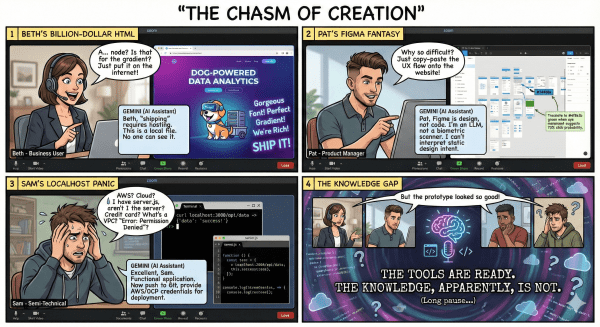
But here’s what I’ve discovered: there’s a massive gap between different skill levels in how people use these AI coding tools. Business users get stuck at the prototype stage. Product Managers (PMs) struggle to go beyond design files. Even semi-technical folks hit walls when it comes to deployment and backend infrastructure.
This guide is my attempt to bridge those gaps and help more people join the creative force of building their own solutions.
🎯 The User Spectrum: Where Do You Fit?
Before diving in, let’s understand the typical journey and where most people get stuck:
User Type
Prototype Goal/Tool
The Production Gap
Business Users
Prototype web pages, architecture diagrams, forms in Canvas/Gemini.
Stop at the local HTML file; can’t distribute.
Product Managers (PMs)
Granular design control in Figma, Canva, or V0.
Struggle to bridge the design file to a working application.
Semi-Technical Users
Understand high level concepts. Or a specific domain expert (Data, UI/UX, Security etc.)
Hit walls on building on full stack applications like hosting, databases, authentication, and systematic execution.
Full-Stack Engineers
Not the target audience; use AI to accelerate workflow.
N/A (Already know the landscape). Maybe keep updated with the latest AI Agent studies or frameworks.
This guide is for everyone else trying to level up.
Stage 1: From Prototype to Public URL
Let’s start with the most common scenario: you’ve built a static prototype, and now you want to share it with the world.
The Publishing Problem
You have an HTML file on your computer. Great! But how do you give it a real web address that others can visit? This is where most beginners get stuck.
The solution is simpler than you think: Deploy with an AI IDE.
Open an AI-powered IDE like Cursor, Google’s new Antigravity, or use CLI tools like Claude Code or Gemini CLI.
Load your HTML file into the project folder.
Prompt: “Help me deploy this to Firebase Hosting and walk me through the steps”.
Follow the instructions (create a Firebase account, install Firebase CLI, run deployment commands).
Done—you now have a live URL like yourproject.web.app. This works beautifully for static sites: portfolios, landing pages, or simple interactive tools.
Stage 2: Understanding the Backend Layer
A static frontend is fine for displaying information, but what if you want multiple users to log in, save user-generated data, or provide personalized experiences?
You need a backend—the invisible infrastructure that handles databases, APIs, authentication, and business logic.
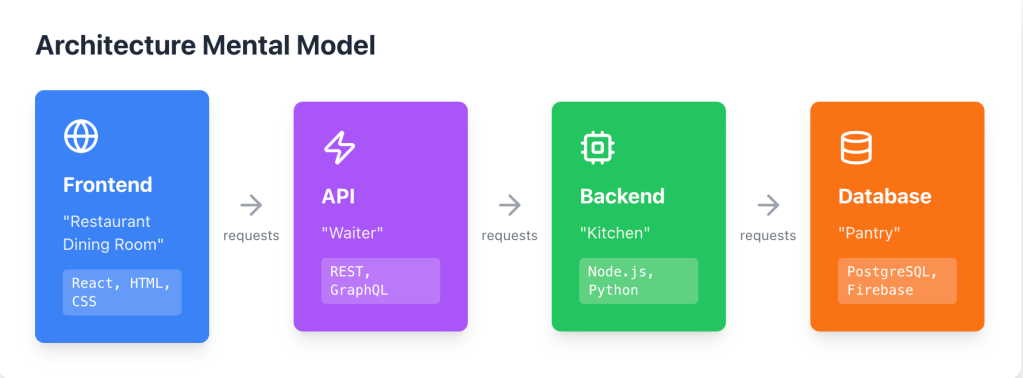
The Mental Model
Think of your application like a restaurant:
Frontend = What users see and interact with (the restaurant dining room).
Backend = Where data is processed and stored (the kitchen).
Database = Where information lives permanently (the pantry).
API = How the frontend and backend communicate (the waiter taking orders).
Designing Your Application Architecture
Before asking an AI to build anything, spend time thinking through:
What data does my application need? (e.g., User profiles, Content, Transaction history).
What actions should users be able to perform? (e.g., Create, read, update, delete data; Search, filter).
What are the key user flows? (e.g., Sign up → onboarding → main action → outcome).
I typically start by having a conversation with Gemini, Claude, or ChatGPT:
“I want to build [description of app]. Help me design the data model and list the key functionalities I’ll need.”
You can even feed business problem documents and ask for a complete technical design document. The output will give you a structured blueprint to work from.
Stage 3: Building the Full Application
Now you’re ready to build the real thing. Here is the recommended workflow:
1️⃣ Project Setup
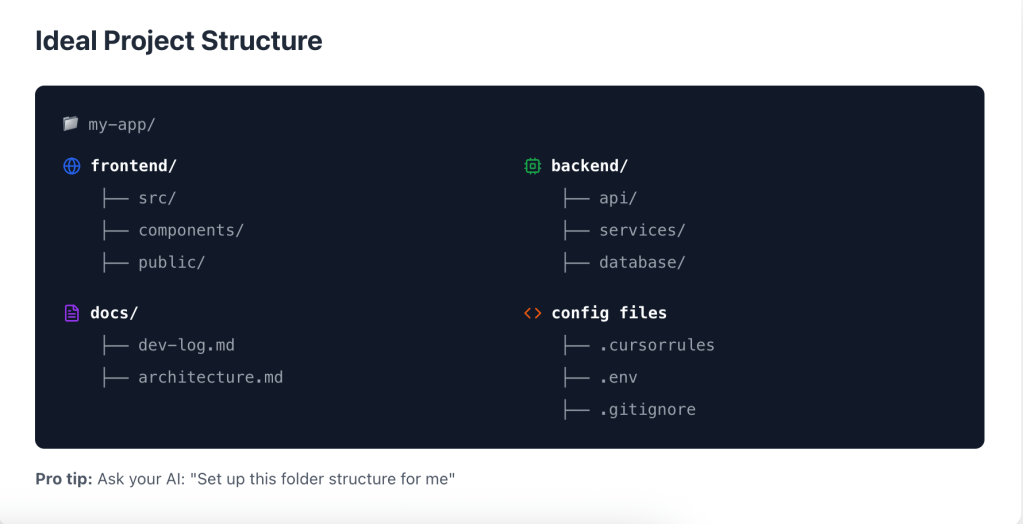
Create a local project folder and gather your materials:
Assets from Frontend prototype (from Canvas or V0)
Technical design document (from your LLM conversation)
2️⃣ Choose Your Coding Agent
Pick one: Claude Code, Cursor, Google’s Gemini CLI, or Google Antigravity.
3️⃣ Set Up Best Practices (The Constraint File)
Critical step: Create a .cursorrules (for Cursor) or .claude.md (for Claude Code) file in your project root. This file tells the AI assistant your preferences and constraints, something like:
Use TypeScript for all code
Follow REST API naming conventions
Include error handling in all functions
Use Tailwind CSS for styling
Prefer functional components in React
Keep files under 500 lines
4️⃣ Create a Documentation Workflow
Ask your coding agent to maintain a dev-log.md file where it documents:
What was built each session
Key decisions made
Known issues or TODOs
This becomes invaluable when you return to a project after weeks away.
5️⃣ Implement with fullstack in mind
Work with coding agent and develop the follow components:
Phase
Goal
Example Prompt
Phase 1: Structure
Set up the basic routing and folder structure.
“Create a well-structured project with frontend (React) and backend (Node.js/Express) folders. Set up the basic routing and folder structure.”
Phase 2: Database
Set up the database schema based on your data model.
“Based on our data model, set up a PostgreSQL database with these tables: [list them]. Include proper relationships and indexes.”
Phase 3: API
Build REST API endpoints with validation and error handling.
“Build REST API endpoints for [specific functionality]. Include input validation, error handling, and proper HTTP status codes.”
Phase 4: Connect
Wire up the frontend to call the new API endpoints.
“Based on the design from [your prototype folder], write up the frontend to call these API endpoints. Add loading states and error handling.”
Phase 5: Auth
Implement user authentication (sign-up, login, etc.).
“Implement user authentication using [Firebase Auth / Auth0 / JWT]. Include signup, login, and password reset flows.”
Stage 4: Version Control & Collaboration
Even when you are building solo, Version Control (using Git) is an essential practice that protects your work and streamlines your development process. It’s how professional teams manage their codebase, and your AI assistant can handle the setup.
The Benefits of Using Git
Experiment Without Fear: Safely create feature branches to try new ideas, knowing you can always roll back if they break something.
Time Travel: Roll back to previous working versions or inspect exactly what changed and when.
Collaboration: Coordinate work easily with other developers (or your future self, which is often the most important collaborator).
Audit Trail: Maintain a clear history of all changes.
Setting Up Git with Your AI Assistant
Use a dedicated prompt to ensure all best practices are followed from the start:
"Set up Git for this project. Create a .gitignore file (for my Node.js/React project). Initialize a remote repository on GitHub. Walk me through the first commit and push to main."
Follow the instructions provided by your AI. You’ll end up with your code safely backed up in the cloud, protected by version history.
Stage 5: Development and hosting
You’ve successfully built a working application locally and set up version control. The final challenge is Deployment—getting your code onto a server so the world can use it.
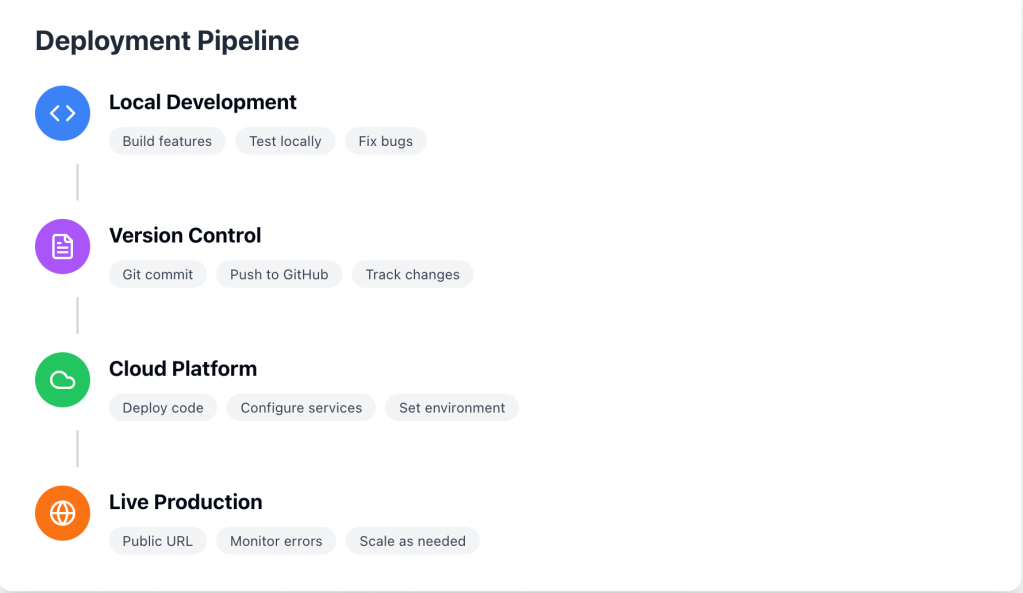
A Typical Deployment Pipeline
This process generally involves three steps: building the code, packaging it (often in a container), and pushing it live.
Option A: Firebase for Simple/Full-Stack Apps
For the vast majority of personal projects and small-to-medium-sized applications, Firebase (Google’s development platform) is the friendliest and fastest path to production.
Component
Firebase Service
Use Case
Frontend Hosting
Firebase Hosting
Fast, secure hosting with built-in CDN.
Authentication
Firebase Auth
Ready-to-use user sign-up/login.
Database
Firestore
NoSQL database that scales automatically.
Backend Logic
Firebase Functions
Serverless functions for running backend code.
Firebase handles a surprising amount of traffic and complexity with its generous free tier. Don’t dismiss it as “not scalable” until you’re serving tens of thousands of users.
Sample Prompt: “Help me deploy this full application to Firebase. Set up hosting for the frontend, deploy cloud functions for the backend, and configure Firestore for the database.”
Option B: Cloud Platforms for Complex Applications
If you need heavy compute power, advanced networking, or massive data storage, you’ll need one of the major cloud providers (GCP, Azure, AWS). All offer substantial free trial credits.
The key is to start small and use managed services:
Deploy your backend as a containerized service (e.g., Cloud Run, ECS, or App Service).
Host your frontend on a CDN (Content Delivery Network).
Use a managed database (e.g., Cloud SQL, RDS, or Azure Database).
Prompt (Cloud Run Example): “Help me deploy this Node.js backend to Google Cloud Run. Set up environment variables, configure the Dockerfile, and handle continuous deployment from GitHub.”
The All-in-One Option
If you want to skip the complexity of cloud configuration entirely, platforms like Replit or Bolt handle everything from coding to production hosting in one interface. You literally describe what you want, and they build and deploy it. The tradeoff is less control and potential vendor lock-in.
Stage 6: AI-Powered Applications
Now that you understand the full stack (Frontend, Backend, Database, Deployment), let’s talk about the most exciting step: building applications that leverage AI themselves to provide high-value, intelligent functionality.
From example, leveraging prompt engineering, you’re taking structured data captured by your app, combining it with user context, and asking an LLM to provide expert-level analysis.
💡 Example: Child Milestone Evaluation App
Here is a real-world application built on this pattern that provides genuine, expert-level insight:
Component
Description
The Problem
Tracking my child’s developmental milestones against CDC guidelines and getting actionable, personalized insights, not just a pass/fail grade.
The Goal
Generate a professional, evidence-based development report on demand.
The Solution Flow
Data Capture: There is a knowledge base, you can ask LLM to capture the CDC guidelines from it’s website and save it in the database. The frontend (a survey interface) collects checked-off completed milestones from the user.
Data Layer: The backend stores the checklist responses and critical family background information ([context]) in the database.
The API Call: The application sends the raw survey results ([data]) and the stored family context to the LLM (Gemini/Claude) via an API request.
The Prompt: “Given these developmental milestone results [data] and family background [context], analyze my child’s development against standard guidelines. Identify any areas of concern, highlight strengths, and provide specific, evidence-based recommendations for activities and next steps.”
The Output: The LLM’s structured analysis is returned to the backend, which then formats it into a downloadable PDF report for the user.
Stage 7: AI Agents & Advanced Workflows
The next frontier is AI agents—autonomous systems that can use tools and make decisions to accomplish complex tasks.
An AI agent is essentially an LLM with:
Access to external tools/functions (web search, databases, APIs, calculators)
The ability to plan multi-step sequences
Logic to decide which tools to use and when
Frameworks and Tools
Code-Based:
LangChain: Python/JavaScript framework for building LLM applications
Google Agent Development Kit (ADK): Powerful Agent Development Framework to facilitate your agent development.
Model Context Protocol (MCP): Standard for connecting AI to data sources
Low-Code/No-Code:
n8n: Visual workflow builder with AI nodes
Example Use Case
Imagine a “Research Assistant” agent:
User asks: “Summarize the latest research on [topic]”
Agent searches academic databases (tool use)
Agent fetches and reads relevant papers (tool use)
Agent extracts key findings
Agent writes a synthesis report
Agent saves report to user’s Google Drive (tool use)
This requires orchestrating multiple LLM calls, tool invocations, and decision logic—but frameworks like LangChain make it surprisingly accessible.
✅ Key Principles for Success
After building dozens of these applications, here are my core principles:
Start with the Problem: Don’t build because you can—build because you should. Focus on repetitive tasks or decisions that could be better informed.
Prototype Fast, Iterate Faster: Use Canvas or V0 to visualize ideas in minutes. Don’t spend weeks on something before testing the core assumption.
AI is Your Pair Programmer, Not a Magic Wand: The AI handles syntax and boilerplate; you handle product decisions and architecture.
Documentation is Non-Negotiable: Keep a dev-log.md. Future you will not remember why you made that decision.
Security From Day One: Never hardcode API keys. Implement authentication before going public.
The Best Code is Code You Don’t Write: Use existing services: Firebase Auth, Stripe for payments, SendGrid for emails. Focus on your unique value proposition.
Common Pitfalls to Avoid
Database Design Mistakes Spending 30 minutes thinking through your data model before you start coding saves hours of migration headaches later. Changing a schema after your app is built is a complex task. Design First.
Over-Engineering Complexity You don’t need microservices, Kubernetes, or complex architectures for your first app. Start practicing with simple solutions and gradually move into complex applications. Simple is always better than unnecessarily complex. Simple is Good.
Ignoring Cloud Costs Cloud and AI services are cheap at low scale but can surprise you with unexpected bills. Always set up billing alerts and take the time to understand the pricing model for the services you use. Be Cost-Aware.
Skipping Error Handling Your “happy path” (the perfect scenario) will work fine. It’s the edge cases and unexpected inputs that break things in production. Ask your AI to add comprehensive error handling to every function. Expect Failure.
Relying Only on Local Testing Deploy only after you’ve confirmed everything works on your local machine, but never stop there. Cloud debugging is 10x harder. The hosted version can have issues even if local testing passes perfectly, as environments and connected services are different in production. Test Live.
🏗️ Your Next Steps
If you’re reading this and thinking “I want to build something,” here’s what to do:
Identify a problem you personally experience.
Open your preferred LLM (Gemini, Claude, or ChatGPT) and describe what you want to build.
Ask for a technical design document.
Build the first version. Aim for “works for me,” not perfection.
Get it online. Deploying something is a psychological milestone.
The barrier to building software has dropped from “years of study” to “clear communication and persistence”. AI coding assistants have created millions of new builders.
The tools are ready. The question is: are you?
Your First Action Item:
Stop reading and start building. That idea you’ve been sitting on? You can build it. Today. Right now.
Note: this blog post is polished with the help of Gemini and Claude.
I co-authored this one on the Google Cloud blog with Michael Stern, announcing the preview of Anthropic’s Claude models running against BigQuery data through BigQuery ML.
The short version: an analyst who knows SQL can now run generation, summarization, translation, and classification directly against warehouse data — no data movement, no separate ML pipeline, no specialist ML background required.
That last part is the bit I care about most. A large amount of genuinely useful language-model work is blocked not by model capability but by plumbing: getting the data out, through an API, and back somewhere useful. Removing the plumbing changes who is able to do the work.
Three ways in
BQML with SQL — call the model as a function inside a query
Python in BigQuery Studio — for notebook-driven workflows
BigQuery remote functions — for the cases needing custom logic in between
The examples
The article works through two: summarizing operational logs and returning recommended fixes, and translating museum art descriptions. They’re deliberately mundane — that’s the point. These are the kinds of tasks that pile up in a warehouse and never justify a dedicated ML project, which is exactly why making them a SQL function matters.
I co-authored a piece on the official Google Cloud blog with Hugo Selbie, on a problem that comes up constantly for generative AI and media companies: how do you analyse unstructured assets — images, video, audio — alongside the structured behavioural data that describes how people actually use them?
If you run an image generation product, your most valuable signal is split across two worlds. The generated assets sit in object storage. The user behaviour — prompts, retries, downloads, shares — sits in your warehouse. Answering “which kinds of output actually get kept?” means joining across both, and traditionally that meant building a pipeline to move and pre-process petabytes of media before you could ask the first question.
The approach
The article walks through using BigQuery as the single hub instead:
Object tables over Cloud Storage via a BigLake remote connection, so unstructured assets are queryable in place rather than copied
Native BQML functions to call generative models directly from SQL
Remote UDFs backed by Cloud Functions, for the cases where you need to reach Vertex AI APIs directly
The result is that analysts can interrogate media assets and user behaviour in one query, at petabyte scale, without a separate preprocessing pipeline and without duplicating storage.
Why it matters
The use cases this unlocks are the ones product teams actually care about: understanding which model outputs perform, flagging inappropriate content, improving search over a media catalogue, and doing it without standing up bespoke infrastructure for each question.
The full walkthrough — including the five-step implementation and the SQL — is on the Google Cloud blog.
475g coconut water (Suggest buying 1L bottle from the super market)
100g whole fat milk
50g heavy whipped cream (you can replace this with milk itself if want it less creamy)
150g condensed coconut milk (Do not refrigerate. Otherwise, it will solidify. )
7g gelatin powder
40-60g sugar (adjust to taste)
5.5 oz portion cups. (you can make 8 cups per batch)
Instructions:
In a large cooking pot, combine the condensed coconut milk, whole fat milk, 450g of coconut water, and sugar over low heat. Stir the mixture continuously to ensure it is well combined, but be careful not to bring it to a boil. Heat the mixture until it reaches 60 degrees Celsius.
In a separate bowl, dissolve the gelatin powder in 25g of coconut water. Mix well until the gelatin powder is fully dissolved.
Add the gelatin mixture to the pot with the coconut milk mixture from Step 1. Stir the mixture until the gelatin is fully dissolved and combined. Do not heat the mixture again.
Remove the pot from the heat and pour the mixture into small cups.
Chill the cups in the refrigerator for at least 4 hours or until the coconut jelly is set.
Serve the coconut jelly cold with optional toppings like chopped mango and coconut flakes.
Enjoy your delicious and refreshing Coconut Jelly!
This is a summary of all the announcements we heard discussed during Google Data Summit 2022. Hopefully, this can help you easily to find all the updates.
Vertex AI Workbench (GA), bringing together Google Cloud’s data and ML systems into a single interface so that teams have a common toolset across data analytics, data science, and machine learning.
With native integrations across BigQuery, Spark, Dataproc, and Dataplex
Data scientists can build, train and deploy ML models 5X faster than traditional notebooks.
Introducing Vertex AI Model Registry, a central repository to manage and govern the lifecycle of your ML models. Designed to work with any type of model and deployment target, including BigQuery ML, Vertex AI Model Registry makes it easy to manage and deploy models.
Matching Engine – Vertex AI Matching Engine provides the industry’s leading high scale, low latency, vector-similarity matching (also known as approximate nearest neighbor) service, and industry-leading algorithms to train semantic embeddings for similarity-matching use cases.
Is a storage engine that unifies data lakes and warehouses by providing consistent fine-grained security and performance acceleration across multi-cloud object stores. This extends BigQuery capabilities to open formats & OSS engines
Provides an API interface that enables customers to query data across GCP & OSS engines, enabling customers to unlock new use cases without writing new infrastructure
Bigquery
Analytics Hub (Preview) , a fully-managed service built on BigQuery that allows our data sharing partners to efficiently and securely exchange valuable data and analytics assets across any organizational boundary.
Bigquery BI Engine SQL Interface (GA), BigQuery BI Engine is a fast, in-memory analysis service that lets users analyze data stored in BigQuery with sub-second query response times and with high concurrency. It is compatible with any BI tool that uses BigQuery.
Log Analytics Capabilities in Bigquery (Preview) – Log Analytics gives you the analytical power of BigQuery directly in Cloud Logging with a new user interface that’s optimized for analyzing logs data. With Log Analytics, you can use SQL to perform advanced logs analysis.
Native JSON (Preview) – By using the JSON data type, you can ingest semi-structured JSON into BigQuery without providing a schema for the JSON data upfront. This lets you store and query data that doesn’t always adhere to fixed schemas and data types.
Search (Preview) – Fully managed search indexes let you pinpoint specific text in data of any size across multiple columns and semi-structured datasets using SQL
Spark on Google Cloud
First in industry Serverless Spark for All Workloads (GA), Auto-scale without any manual infrastructure provisioning or tuning for Spark. Empowers customers to shift from managing clusters to workloads.
Pervasive Spark Experience (Preview), Connect, analyze and execute Spark jobs from BigQuery, Vertex AI or Dataplex in 2 clicks, without any custom integrations, using the best of Google-native and Open Source tools.
Flexibility of Consumptions (GA), One size does not fit all. Choose between Serverless, Google Kubernetes Engine (GKE), and compute clusters for your Spark applications.
Data Processing
DataFlow Prime (GA): Gain real-time insights and actions with industry leading serverless architecture. This update enabled key features like Vertical Auto Scaling, Right Fitting and Smart Diagnostics
Security and Data Governance
Dataplex (GA) – unified platform for data management and data governance including features like Catalog, Quality control, Classification, Security, and Lifecycle management.
Data lineage (Preview) – Record, visualize, and understand the relationships between data assets based on flow of data – mapping out the journey of how data assets are sourced and transformed. This will be part of dataplex.
Data Studio has been moved into the Google Cloud portfolio (from Google Ads). Data studio is part of the Looker team now. It will still be free and it is just being strategically linked and further developed as a part of GCP’s overall BI strategy.
Looker + Data Studio Integration (GA), Enable Google Data Studio users to read Looker’s Semantic Model
Connected Sheets for Looker (Preview) – Google sheets to read Looker’s Semantic model. (Looker Enterprise Customer)
Better data blending in Data Studio – H1 2022
New filter shelf in Data studio – H1 2022
Looker for Google Slides – GA – H2 2022
Google maps in Looker – GA – H2 2022
Ask Looker – Preview Q2 2022
Anomaly and Insight Detection – Preview H2 2022
Improved Looker mobile experience – GA H2 2022
Looker for Tableau and Power BI – Preview H2 2022
Looker Marketplace Developer Program – Preview Q1 2022
Looker integration with data workflow orchestration tools like Apache Airflow or Cloud Composer – GA Q1 2022
VPC – service controls – GA Q2 2022
Data Analytics Accelerators
Lot of new updates on Data Analytics Accelerators: this program included 4 pillars including:
Cloud SQL Insights for MySQL (Coming Soon) – this will provide the similar capabilities like we do have in Cloud SQL for Postgres.
Cloud Spanner change streams (Coming Soon) – this allows you to replicate database changes in real time and enables easy access and integration with your Analytics Platform.
Modernize your Oracle workloads to PostgreSQL with Database Migration Service (Preview)
Migrate from Apache HBase to Cloud Bigtable with Live Migrations (GA)